
Unstoppable terminal for crypto trading
Connected venues
36 exchanges. One terminal
Spot, futures, margin, perpetuals. CEX and DEX.
Charts
Two options for
technical analysis
TradingView and Native Charts
Cluster History
Cluster history
A real-time stream of every executed market order. Timeframes from seconds to days, big prints highlighted, scroll back to any orderbook state. What candles only summarize.
Showcase
Every setting you need
6.1 · Multi-Orderbook Layout
100 orderbooks
0 freezes
- Open as many books as your monitors can hold. Nothing drops.
- Link orderbook and chart — one click opens a new instrument.
- Per-exchange connection and orderbook configuration.
6.2 · Cluster Footprint
Where size actually traded
- Sum of executed volume at every price, period by period.
- Delta column — market buys vs market sells, per cluster.
- Bin from 0.1 ticks up to a full candle. Tune it to your timeframe.
6.3 · Time & Sales
Only the prints that matter
- Filter by size. Anything below your threshold disappears.
- Big prints flash. You see whales coming.
- Replay any window of any pair. Down to the millisecond.
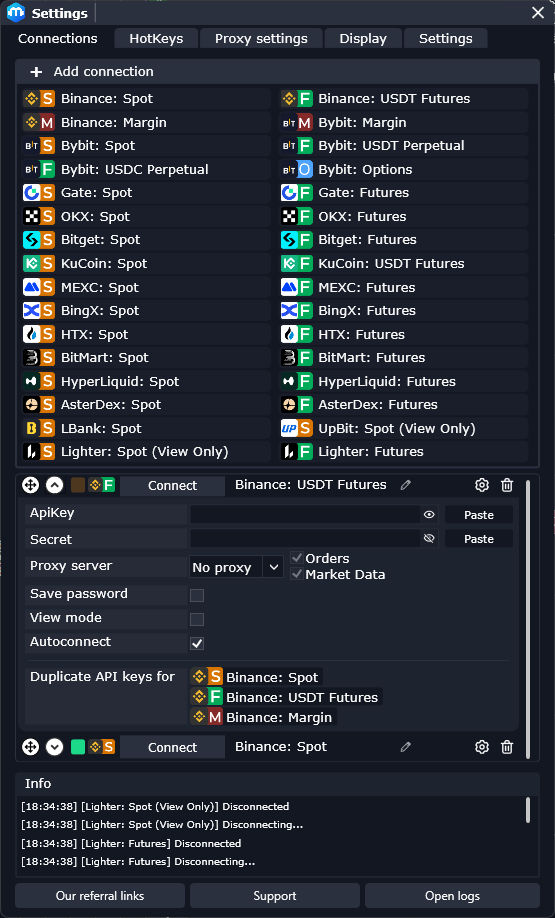
6.4 · Exchange Setup
Connected in 30 seconds
- Paste your API key. Stays on your machine. We never see it.
- Per-exchange proxy. Geo restrictions go away.
- 36 exchanges in one interface.
SDK
1 API. 36 exchanges
Free technical tool for your algotrading or vibe-coded trading.
- Same async API for order book, trades, klines, balances, orders.
- Python and TypeScript. Typed. Full IDE autocomplete.
- Proxy rotation, websocket reconnect, backpressure — built in.
- Migrate from CCXT in one line.
# Unified streaming across 36 venues
from metascalp import Client, Side

async with Client("binance", proxy="socks5://127.0.0.1:1080") as ex:
    async for book in ex.orderbook("BTC/USDT", depth=200):
        if book.imbalance > 0.7:
            await ex.place(
                "BTC/USDT",
                side=Side.BUY,
                qty=0.01,
                post_only=True,
)Full venue list
Where you trade. We're already connected
Centralized · Trading











Native DEX
 HyperliquidPerpetual
 AsterDexPerpetual
 LighterPerpetual
 EdgeXPerpetual
 dYdXPerpetual · View-only
 ApeX OmniPerpetual · View-only
 GRVTPerpetual · View-only
Read-only feeds
 UpbitSpot
 WhiteBitSpot · Futures
 OurbitSpot · Futures
 WEEXSpot · Futures
 BitunixFutures
 BloFinSpot · Futures
 PhemexSpot · Futures
 BitfinexSpot · Futures
 CoinbaseSpot
 ToobitFutures
 OrangeXFutures
 BithumbSpot
 BitrueSpot · Futures
 CoinWSpot · Futures
 GeminiSpot
Traditional markets
 MOEXEquities · Futures · View-only
 T-BankBrokerage · Trading
Academy
Never traded order flow? Start here
Free course. Real mentors. Real markets, not theory. The mini course gets you reading flow by tonight. Full program goes deep on footprint, tape, and execution.
- Free. No upsell.
- Real mentors. Live Q&A.
- Built for traders who've never seen a footprint chart.
- 01Welcome & Course Overview5m
- 02Tools & Setup4m
- 03Key Trading Terminology17m
- 04Market Structure & Instruments8m
- 05Exchange Registration & Setup13m
- 06Deposits, Withdrawals & Networks11m
- 07MetaScalp Configuration12m
Download Connect Trade
Download for free. Traders shouldn't have to pay to use the best tools.
Windows-only · macOS in the works
FAQ
Short answers.
Why Windows only?
We ship one platform exceptionally rather than three platforms okay. macOS is being evaluated based on demand. If you're on Mac, run it through Parallels or Bootcamp — that's what most of our Mac users do.
How is it different from Bookmap, Quantower or CScalp?
Bookmap is heatmap-first, expensive, not built for order-book scalping. Quantower is multi-asset and pricey. CScalp is closest in audience but locked to one broker. MetaScalp is free, focused on crypto scalping, and supports more venues than any of them — DEX included.
Is the SDK a real CCXT replacement?
For crypto trading workloads — yes. CCXT is a library; MetaScalp SDK is a local HTTP + WebSocket service. Your bot talks to MetaScalp, MetaScalp talks to the exchanges. Three wins: any language with HTTP, MetaScalp handles auth, and you get cluster footprint data CCXT can't give you.
Can you access my keys or funds?
No. Keys live locally on your machine and never leave it. MetaScalp talks to exchanges directly from your computer — we don't proxy anything. We have no path to your funds.
I'm new to scalping. Where do I start?
Install MetaScalp and join the free Academy. The 4-hour mini course covers the basics. Hop into our Telegram for live help from mentors and other traders.
Mobile version?
Not yet. Scalping needs multi-monitor desktop ergonomics — mobile doesn't fit. A read-only companion app for position monitoring is on the long-term list.